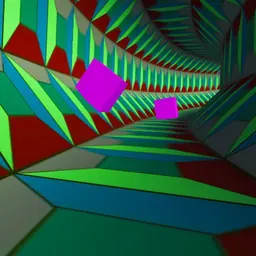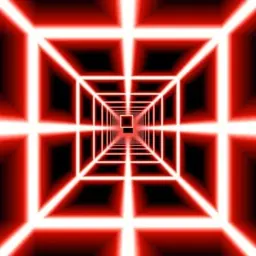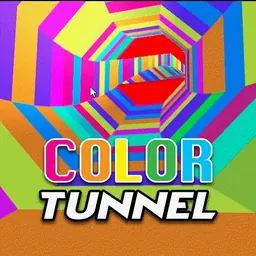
Color Tunnel is an exhilarating fast-paced 3D arcade runner that propels players down an ever-changing tube filled with vibrant colors and sudden obstacles. As you travel forward at breakneck speeds, your viewpoint rotates through a kaleidoscope of shifting geometric patterns. Every second demands razor-sharp reflexes and constant focus to dodge barriers, navigate tight gaps, and stay alive inside the twisting tunnel.
The game has become a massive favorite among arcade enthusiasts and students because of its instant accessibility and thrilling replay value. With no long tutorials or complicated mechanics, you can jump straight into a run during a quick school break or challenge classmates to see who can survive the deepest into the glowing speedway.
How to play Color Tunnel
The main goal in Color Tunnel is simple: travel as far as possible through the endless cylindrical passage without crashing into any obstacles. As soon as a run begins, your perspective surges forward automatically along the inside of the tube. Geometric obstacles in various shapes, such as spinning wedges, sliding barriers, and shifting arches, appear ahead in the distance and rapidly rush toward your screen.
A single collision with any wall barrier immediately terminates your run and displays your final score. Surviving longer requires you to quickly recognize oncoming obstacle formations, identify the open gaps, and steer your position along the tunnel wall to slip through cleanly. Along your journey, you can also collect power-ups that grant useful temporary advantages, such as invincibility or speed boosts. As your distance increases, the speed ramps up and the color patterns shift dynamically, creating a visually stunning test of depth perception and hand-eye coordination.
Controls and movement
Color Tunnel is designed with intuitive, responsive controls that work seamlessly on standard keyboards and school Chromebooks. Because the environment is cylindrical, steering rotates your movement along the curved perimeter of the tunnel.
Use the Left Arrow key or A to steer left around the tunnel wall. Use the Right Arrow key or D to steer right around the tunnel wall. On devices with touchscreens, you can also use swipe controls to slide left or right across the display. Light, deliberate taps are often more effective than holding down keys continuously, giving you finer control when aligning with narrow openings.
Tips and strategies for higher scores
Earning a top score in Color Tunnel takes practice, patience, and good visual discipline. Instead of looking right in front of your current position, focus your eyes further down the center of the tunnel. Spotting upcoming barriers early gives your brain valuable time to plan the safest route through multiple hazards in sequence.
Avoid over-steering when dodging obstacles. Panicking and holding a direction key down too long can cause you to swing right past a safe gap and smash into the opposite side. Aim for smooth, controlled movements and return toward open sections of the track after clearing each barrier.
Pay attention to moving hazards and rotating obstacles. Some barriers rotate or slide across the track in set patterns. Anticipate where an opening will be by the time you reach it rather than steering toward where the gap was when it first spawned. Staying calm as the tempo accelerates will help you push your high score further.
Playing Color Tunnel unblocked at school
Color Tunnel is a great choice for students who want a fun reflex challenge on school Chromebooks during recess, study hall, or free time. Because school network filters sometimes restrict access to particular web pages, this directory lists several verified server buttons directly beneath the main title.
If one server button happens to be filtered or temporarily inaccessible on your network, simply try another server button from the list above to start playing. The game runs directly inside standard web browsers without needing any file downloads or extensions.
Games like Color Tunnel
If you love fast reaction games and vibrant 3D obstacle courses, there are several similar titles on this site worth checking out.
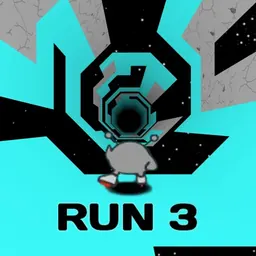
Tunnel Rush offers another intense rush through neon tubes packed with spinning barriers and geometric obstacles. If you enjoy steep downhill speed runs, Slope challenges you to guide a rolling ball down narrow neon tracks without falling into the void. For gravity-shifting platforming through space corridors, Run 3 delivers deep exploration and agile jumping. You can also explore rhythm-based timing in Geometry Dash or enjoy momentum swings in Stickman Hook.
FAQ
Is Color Tunnel unblocked free to play?
Yes, Color Tunnel is completely free to play directly in your web browser. You can enjoy unlimited runs, practice your steering skills, and aim for new personal bests without paying any fees or creating an account.
Does Color Tunnel run smoothly on school Chromebooks?
Yes, Color Tunnel is lightweight and runs smoothly on standard school Chromebooks and laptops. The game runs on modern web technology that delivers responsive controls and steady frame rates directly in your browser.
How is your high score saved in Color Tunnel?
Your personal best score is typically stored in your local browser cache and local storage. As long as you play on the same device and browser without clearing your browsing data, your record will be retained.
Who developed Color Tunnel?
Color Tunnel was created by independent web game developers and published across browser gaming platforms, where it gained widespread popularity as a fast-paced 3D arcade runner.
Why do players search for Color Tunnel unblocked 66, 76, and 77?
Students frequently search for terms like Color Tunnel unblocked 66, unblocked games 76, and unblocked games 77 when looking for active mirrors of their favorite browser games. This directory organizes working server links directly at the top of the page so you can jump into the action without searching through multiple websites.
Can you pause Color Tunnel during a run?
On most keyboard versions of Color Tunnel, you can press the spacebar or escape key to pause the game or restart quickly after a collision, letting you take a break without losing your focus.