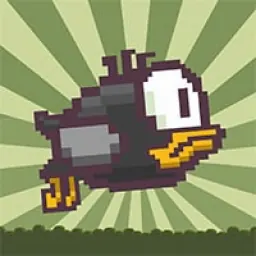
Flappy Bird 2 is an addictive browser arcade game where players guide a flapping bird through an endless series of green pipes and obstacles. Building on the legendary one-button formula that captured the internet, this edition challenges your timing and hand-eye coordination with simple yet demanding reflex-driven flight mechanics.
The appeal of the game lies in its immediate pick-up-and-play simplicity combined with intense difficulty. Every flight requires steady concentration, as even a minor misjudgment can send your bird tumbling into a pipe or dropping to the ground. Quick restarts and the constant pursuit of a higher score make it an enjoyable choice for quick breaks during the school day.
How to play Flappy Bird 2
The core objective in Flappy Bird 2 is straightforward: navigate a small bird across a scrolling 2D landscape without colliding with obstacles or touching the terrain. As the screen scrolls continuously to the right, green pipes appear from the top and bottom with narrow gaps in between. Each time you successfully maneuver through a set of pipes, you earn one point toward your overall score.
Because gravity constantly pulls your bird downward, maintaining altitude requires steady and well-timed flaps. Touching any part of a pipe, crashing into the ceiling, or dropping onto the grassy floor ends your attempt instantly. Surviving longer requires finding a steady tapping rhythm that keeps the bird hovering at the exact height needed to clear upcoming pipe openings.
Controls and flight mechanics
Flappy Bird 2 relies on universal one-button controls that work seamlessly across desktop computers, laptops, and school Chromebooks.
On most versions, you can flap your wings by pressing the spacebar, clicking the left mouse button, or tapping the up arrow key. On touchscreen devices such as Chromebook tablets, tapping anywhere on the display triggers an upward flap. Each input gives your bird a brief upward burst, followed immediately by downward gravitational pull.
Mastering flight requires understanding the physics of the bird's arc. Quick consecutive taps cause the bird to rise sharply, while pausing between taps allows it to descend smoothly. Balancing these inputs ensures you do not overshoot high gaps or plummet before entering lower pipe openings.
Tips and strategies for higher scores
Earning high scores in Flappy Bird 2 demands patience and composure under pressure. Instead of watching your bird exclusively, keep your eyes focused slightly ahead on the next pipe opening. Anticipating the height of the upcoming gap gives you sufficient time to adjust your tapping cadence before reaching the obstacle.
Establish a consistent rhythm rather than reacting in panic. Small, controlled taps make it easier to stabilize the bird in the center of the screen. When approaching a low pipe opening, allow gravity to lower the bird naturally, then tap once or twice to level out right as you enter the gap.
Stay calm after close calls or mistakes. Because each run begins immediately with a single tap, taking a short breath between attempts helps prevent rushed inputs and frustration. Consistency and gradual pattern recognition are the keys to climbing the scoreboard.
Playing Flappy Bird 2 unblocked at school
Flappy Bird 2 is an ideal casual arcade title for students looking to enjoy quick gaming sessions during free periods, lunch breaks, or study halls. Because school networks sometimes apply web filters that block individual gaming domains, this directory provides multiple working server options directly beneath the main title.
If one server link happens to be restricted on your Chromebook or school network, simply switch to another server button from the list above. The game runs entirely inside modern web browsers using lightweight web technologies, allowing you to jump straight into the action without requiring extra software installations or profile sign-ins.
Games like Flappy Bird 2
If you enjoy precision arcade gameplay and quick reflex challenges, several other popular titles on this website deliver a similar thrill.
For rhythm-based obstacle navigation with instant restarts, check out Geometry Dash, where timing your jumps to the beat is essential for survival. If you prefer endless climbing and vertical platform hopping, Doodle Jump provides classic arcade entertainment on school devices. Players who love reflex tests can also explore Google Snake, Stickman Hook, and Slope for fast-paced action and engaging high score chases.
FAQ
Is Flappy Bird 2 unblocked free to play?
Yes, Flappy Bird 2 is completely free to play directly in your web browser. You can start playing immediately, fly through pipe obstacles, and chase new high scores without paying any fees or creating a user account.
Does Flappy Bird 2 work on school Chromebooks?
Yes, Flappy Bird 2 runs smoothly on standard school Chromebooks, laptops, and desktop computers. Because the game utilizes lightweight browser-based graphics, it loads quickly and performs reliably on standard school devices.
How do you save your high score in Flappy Bird 2?
Your best score is automatically recorded in your browser local storage at the end of each flight. As long as you play on the same device and browser without clearing your temporary browsing data, your personal record will remain saved for future sessions.
Why do players search for Flappy Bird 2 unblocked 66, 76, and 77?
Students often search for terms like Flappy Bird 2 unblocked 66, unblocked games 76, and unblocked games 77 when looking for mirror sites that remain accessible on school networks. Our directory gathers verified server links at the top of the page so you can launch the game quickly without searching through outdated mirrors.
What makes Flappy Bird 2 so challenging?
The game features unforgiving collision boxes and rapid gravitational pull, meaning even a slight miscalculation will end your run immediately. Navigating narrow openings between pipes requires precise muscle memory, continuous focus, and steady rhythm.
Can you play Flappy Bird 2 using a keyboard or a mouse?
Yes, the game supports flexible input methods. You can tap the spacebar or up arrow key on your keyboard, click the left mouse button, or tap the screen on touch-enabled devices to control your bird.