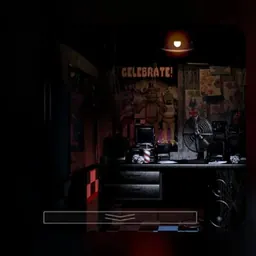
Five Nights at Freddy's Plus is a tense point-and-click survival horror game that reimagines the eerie atmosphere of the original pizzeria night shift. Taking on the role of a newly hired security guard at Freddy Fazbear's Pizza, you must survive five consecutive shifts from midnight until six in the morning. Confined to your small security office, your only defenses against roaming animatronic characters are a surveillance camera monitor, hallway lights, and motorized blast doors.
What makes the game so thrilling is its intense psychological pressure and masterful sound design. Every squeak of the office fan, flickering fluorescent light, and distant laugh heightens the suspense as you track sinister characters across dark rooms. Balancing scarce electrical power with the urgent need to check blind spots creates a suspenseful gameplay loop where split-second decisions determine your survival.
How to play Five Nights at Freddy's Plus
The core objective in Five Nights at Freddy's Plus is to survive from 12:00 AM to 6:00 AM across each shift. As the night progresses, animatronic figures including Freddy, Bonnie, Chica, and Foxy wander through the building toward your security desk. If an animatronic reaches your office while the security doors are open, your run ends in a terrifying jumpscare.
Surviving requires constant vigilance and strict power management. Your office operates on a finite electrical battery each night. Using the surveillance camera monitor, flashing hallway lights, and closing the security blast doors all consume battery power. If your energy meter drops to zero percent before morning arrives, the entire facility goes dark, leaving you defenseless when Freddy makes his final approach.
Controls and office mechanics
Five Nights at Freddy's Plus uses straightforward mouse-driven controls that run smoothly in modern web browsers on laptops, PCs, and school Chromebooks.
Move your mouse cursor to the left or right edges of the screen to pan your view around the security office. Click the red and white door buttons mounted on the walls to toggle the motorized blast doors and turn on hallway lights. Moving your mouse to the bottom of the display opens and closes your security monitor, where you can click on camera tabs to inspect different rooms, hallways, and the main stage.
Mastering fast, accurate clicking is essential. Efficient movements allow you to check blind spots, verify animatronic locations, and shut the doors in time without wasting valuable seconds.
Tips to survive the night shift
Conserving electricity is the most critical skill for completing later nights. Avoid keeping security doors shut for long periods or staring at camera feeds unnecessarily. Open the monitor only for brief checks to locate active animatronics, then close it immediately to save power.
Pay close attention to audio cues. Footsteps, sudden metallic rattles, and quiet laughter indicate that animatronics are moving between rooms or approaching your hallways. When you hear movement near your office, tap the hallway light button briefly to check the blind spot outside your doorway before deciding whether to shut the blast door.
Keep a watchful eye on Pirate Cove. Checking Foxy's stage on the camera network periodically prevents him from sprinting down the West Hall toward your desk. Staying calm under pressure and establishing a rhythmic checking pattern will help you survive all five nights.
Playing Five Nights at Freddy's Plus unblocked at school
Five Nights at Freddy's Plus is a popular choice for students looking for an engaging horror challenge on school Chromebooks during lunch breaks, study periods, or free time. Because school network configurations occasionally filter specific web links, this page provides multiple working server options directly below the title.
If one server button happens to be filtered on your network connection, simply choose another server button from the list above to launch the game. The experience runs directly inside your web browser through HTML5 technology, meaning you can jump straight into the action without downloading files or installing external software.
Games like Five Nights at Freddy's Plus
If you enjoy spooky atmospheres, high-stakes suspense, and strategic resource management, several other titles on this site deliver memorable gameplay.
For the original title that started the franchise, Five Nights at Freddy's offers the classic pizza parlor survival experience. If you prefer first-person stealth horror and escaping an eerie locked house, Granny challenges you to solve puzzles while avoiding an attentive pursuer.
For fast reflexes and intense dodging under pressure, Bad Time Simulator tests your reaction speed against punishing boss attack patterns. If you prefer tactical defense and grid-based planning against incoming threats, Plants vs Zombies provides hours of strategic fun.
FAQ
Is Five Nights at Freddy's Plus unblocked free to play?
Yes, Five Nights at Freddy's Plus is completely free to play online. You can access the full game directly through the server buttons on this page without paying fees or registering an account.
Can you play Five Nights at Freddy's Plus on a school Chromebook?
Yes, the game runs smoothly inside modern web browsers on Chromebooks, laptops, and desktop computers without demanding heavy hardware or standalone software downloads.
What happens if your power runs out during a night shift?
If your power reaches zero percent, the office lights, security doors, and camera monitor immediately shut off. The room is plunged into darkness, and Freddy Fazbear will soon appear at the left doorway playing a music box chime before ending your shift.
Why do players search for Five Nights at Freddy's Plus unblocked 66, 76, and 77?
Search phrases like Five Nights at Freddy's Plus unblocked 66, unblocked games 76, and unblocked games 77 are common queries used by students to find working browser games on school networks. Our directory provides working server buttons at the top of the page for quick access.
How do you save your progress in Five Nights at Freddy's Plus?
Completed nights and customized settings are saved automatically in your browser local storage. As long as you play on the same device and browser profile without clearing your cache, your progress will be saved.
How do you defend your office against approaching animatronics?
Monitor the animatronics on the security cameras to track their progress down the hallways. When an animatronic reaches the hallway blind spot right outside your office, close the corresponding motorized blast door until they leave.